Saturday, 21 January 2017

Shrihari Prakash  /  10:22 pm  /  ,   /  No comments


While music piracy is already losing as more people get online, There are countless entrants joining the race in Online Music Streaming.. So which one should you choose?

The question is actually "Which one is the best for YOU?" Each streaming service has its own set of pros and cons. The matter is to choose the one that works best for you.

THE QUALITY:

The primary objective of any streaming service is in the quality. The quality of a streaming service lies in its music bit rate. At this point, all streaming services offer the same thing. The bit rate varies from 64kbps to 320kbps where free tier users are capped at 128kbps max. theres' no winner here!


THE USER INTERFACE (OR) UI:


UI decides the entire mood of the app.. In terms of UI I would say Hungama and Saavn are the best. Saavn has the most interesting and perfect UI that is very visually appealing and smooth to use as well! Hungama on the other hand has a great color theme and material look. Hungama will be the first to alert you as and when music happens! Im' a great fan of Gaanas' Dark Theme.

Wynk on the other side has a very poorly organised UI. The red theme of Wynk constantly alarms you that it is an app from Airtel. Wynk has a very cluttered and highly un-appealing UI ever..

Winner: Saavn - Hungama Tie


PLANS AND PRICING:

Premium users get a lot of advantages over free users. If you are a music freak, consider upgrading!(seriously!). All services charge almost equally, Rs.99 per month on Android. On Wynk, you get everything for free if you are an Airtel user (yeah data charges apply of course!). The trial period differs for each service. On Saavn and Hungama, you get a 7-day trial to try them out. Gaana gives you a Two week trial and Wynk on the other hand gives you a good One month to try out the app! Wynk also goes on No-ads approach on free  tier but caps the number of songs you can stream in One month.

Winner: Wynk


SPECIAL FEATURES:

Hungama offers Mood based song playbacks and Videos. Saavn and gaana has Exclusive content. Wynk has curated playlist for running.

Winner: Hungama

PLATFORMS:

Gaana:      Android, IOS, Windows Phone, Web, Windows PC
Hungama: Android, IOS, Windows Phone, Web, Windows PC
Saavn:       Android, IOS, Web, Windows PC
Wynk:       Android, IOS, Web (which is pretty useless)

Winner: Gaana - Hungama Tie


SONG LIBRARY:

Saavn has the richest song library of 30 Million songs! Gaana has 10 Million songs, Wynk 2.5 Million and Hungama 2 Million songs. Hungama has a very poor song library and is basically a T-Series distributor in my view. Hungama lacks partnership with important music labels such as Eros Now. I was not able to find most of the songs I needed on Hungama. Saavn throws literally every song you want! Gaana and Wynk has decent library thats' enough for daily use.

Winner: Saavn


OTHER SERVICES: 

While there are other services like Google Play Music, Apple Music and Guvera, none of them are worth mentioning. Apple Music is highly bugged on Android and very costly. Google Play music is very complex to use (atleast in my view). Guvera lacks song collections and has tons of ads!


So its totally upto you to choose which music service to go with. My personal favorites are Saavn and Hungama. So which streaming service are you choosing!?

Thursday, 19 January 2017

Shrihari Prakash  /  2:44 pm  /  , , ,   /  1 comment

Three months after it made a massive splash on iOS, Nintendo’s mobile side-scroller game Super Mario Run finally has a release time frame on Android. The company confirmed, via its Twitter account, that the game will be released sometime in March 2017 in the Google Play Store.

It’s been a bit of a long wait for Android fans to get their hands on the latest Mario game from Nintendo. Super Mario Run launched worldwide in mid-December for iOS and it generated 40 million downloads in just its first four days in the App Store. The excitement for the game has gone down since then, but a launch on Android should help boost those overall download numbers.
The game itself has you controlling Mario in an endless running style of gameplay through a number of 2D worlds that will seem both familiar and new to fans of the Super Mario Bros. console series. You can play part of the game for free but you will have to spend $9.99 to unlock all of its content. You can pre-register for Super Mario Run right now at the link below so you can get informed when it launches.

Nintendo also plan to launch another mobile game, the fantasy tactical-RPG Fire Emblem: Heroes, on Android in about two weeks, on Feb. 2.

Thursday, 1 December 2016

Shrihari Prakash  /  10:12 pm  /  , ,   /  No comments
Facebook Messenger just got a whole new set of games on the app. If you’re worried about the return of Farmville, don’t; playing ‘Pac-Man’ with your friends is now an option on Facebook Messenger. Basketball and football were already available as an option, but it looks like Facebook is adding a lot more games in order to cash in on the fun.

In an official announcement on the Facebook Newsroom, the company says, “Messenger is just got way more… competitive” The post reads, “So when you’re looking for a reason to connect with your best friend who lives on the other side of the world, you can kick off a round of Words with Friends: Frenzy; or try again to beat your roommate at PAC-MAN just once…”

Games available include classics such as “Space Invaders” and “Galaga,” as well as newer titles like
“Words With Friends.” It’s the latest effort by the world’s biggest social network to get people to spend even more time on its properties.

So how can you play these? Facebook Messenger app once updated will have a game controller icon just below the box where you type messages. Tap on the icon, and pick a game that you wish to play. After you finish a round, your friend or friends in that conversation will see your score and can challenge you back. Facebook says people can also discover games within the Messenger search field, or on Facebook News Feed where they can play solo as well.

Facebook Messenger has a over 1 billion monthly users, and the addition of new games will only increase engagement and time-spent on the app. The app will also recommend games based on whether your friends are playing some titles as well. Thankfully you don’t have to worry about gaming requests from strangers in the Messenger app, as you can only play these with your friends.

Facebook is calling this feature “Instant Games,” and it will go live in 30 countries, with 17 titles. For Facebook, ensuring that it continues to dominate the messaging scene is crucial given the rise of new apps like Snapchat, etc. Facebook has been copying Snapcht’s features like Stories, Disappearing message, filters, etc quite aggressively. But the ‘Instant Games’ bit is something that the social media giant managed to capitalise on, and will no doubt be a hit with users especially for ‘Pac-man’ fans.

Monday, 31 October 2016

Shrihari Prakash  /  9:07 pm  /  ,   /  No comments
Gameloft is making plans to launch Asphalt Xtreme, a new spinoff of the publisher’s highly popular Asphalt mobile racing game franchise. The free-to-play title will be released in the very near future for Android gamers in the Google Play Store. Ironically, the “Asphalt” part of the game’s title is a bit of a misnomer, as this spinoff is all about off-road racing; in other words, there’s no asphalt to be seen in the game. Early screenshots and trailers show that it will feature a variety of rally cars, monster trucks, dirt buggies and more off-road vehicles. The game looks like it will feature a number of different locations for its tracks, from deep forests to the deserts of Egypt (complete with pyramids and other ruins).

Gameloft has yet to announce a specific launch date for Asphalt Xtreme, but interested gamers can go ahead and pre-register at its official website. They will be able to snag some bonus in-game content, including the Predator X-18 Intimator dirt buggy. They will also get alerted when the game makes its official debut in the Google Play Store.


Gameloft’s latest racer, Asphalt Extreme, is nearing its Windows Phone and Windows 10 release, with the private beta of the app showing up in the Windows Store. Have you Pre Registered yet!?

Courtesy: Android Authority

Sunday, 9 October 2016

Shrihari Prakash  /  7:51 pm  /  , ,   /  No comments
Facebook is launching a well Trimmed-Down version of the its Messenger app. After the launch of the Facebook Lite which is again a cut down version of the full featured Facebook app, messenger lite provides almost the same experience of the full version yet coming in a friendly package size. With this size, Do Not expect Voice and Video Calls since the main focus of this app is to make it work on slower and older mobiles. The app has the basic functions like texting, sending images and receiving stickers (sending stickers is not possible though.). The lite version of its sister app does not include the diverse emojis of the new messenger app and instead uses the ones included with your android stock. Like the Facebook lite, it'll be interesting to see that the battery will last longer than using the full featured memory suckers.

It seems logical that both Facebook Lite and Messenger Lite are not released on IOS as well as Windows Mobiles since they are targeted for phones with low memory and poor connections. As of the launching phase, it is being launched it 5 countries which include Kenya, Tunisia, Malaysia, Sri Lanka and Venezuela and to be launched soon in other countries over the next few months. You can still get the app in other countries Here.

Thursday, 29 September 2016

Unknown  /  10:12 pm  /  ,   /  No comments


Google has finally launched its Play Music store in India.
The company announced a slew of new products related to India yesterday, but the local launch of its music service was not among them. Nevertheless, a number of eagle-eyed Google fans in India noticed that the service came online for them today — Google later confirmed the launch in a statement.
While the Play Music store has launched, there are some caveats. It doesn’t include the Saavn or Gaana-like ‘All Access’ streaming service and there’s no radio or podcasts yet. The content is priced from 15 INR ($0.22) per track and 90 INR ($1.35) per album.
Google Play Music store was first launched in the U.S. in 2011, so it has taken a long time to make its way to India. But these days India is a key focus for Google, as company CEO Sundar Pichai — who was born in India himself — explained in a recent op-ed. Not only is India tipped to overtake China as the world’s most populous country, but its internet revolution is in its early days — just 300 million of its estimated 1.3 billion population go online now. That presents plenty of growth opportunities and scope for innovation to help things evolve faster. Also, unlike China, Google isn’t locked out of the market so it stands to reason that India could develop into a lucrative market for the search giant.
Google Play Music is joining a congested market though. Apple Music and Australia’s Guvara are among the international players that compete with domestic rivals Gaana, which owned by media giant Times Internet, and Saavn, which raised $100 million led by Tiger Global last year. Others could follow, too.
Competition aside, India is a challenging market for digital goods since buying online is not yet a habit that mainstream consumers have adopted in large numbers. That’s partly down to the need to change behaviors and attitudes, but the fact that credit and debit card penetration is below 10 percent means that few could buy music even if they wanted to.
Earlier this year, Google added carrier billing for content, allowing consumers to make payment via their mobile operator without the need for card. That hasn’t been enabled for Google Play Music purchases yet, but Google hinted that it will be added soon.
“Now you can download your favorite local and global music on Google Play in India, plus get free storage for up to 50,000 songs from your music collection. Currently these services are only available to users with international credit cards, but we’ll be expanding soon to additional forms of payment,” a spokesperson said.

Tuesday, 19 April 2016

Shrihari Prakash  /  4:12 pm  /  , ,   /  3 comments
DOWNLOAD YOUTUBE VIDEOS WITHOUS ANY SOFTWARES LIKE IDM / YTD ... SIMPLEST WAY..

* First go to YouTube , Search and play the video you want to download.
* Now to download, just replace the " www. " with "ss" in the url and hit enter.


It will redirect you to page where you get download options like 720 p, 1080p, or audio mp4 .

First Posted: Mar 2013
Last Updated: Apr 2016

Tuesday, 13 January 2015

Unknown  /  12:36 pm  /  , , ,   /  No comments
Most of the times, Complex Windows operations come handy in just a few simple Command Prompt commands.

Hiding a partition is a good idea when you want to prevent others from accessing your personal files. You don't need any special software to do it. Below are the steps to hide Drives with the help of Windows Command Prompt:

 How to hide the Drives?

Step 1: Hold down the Windows key and press R.

Step 2: Now cmd in the Input Box and hit Enter Key.

Step 3: Now the Command Prompt window will popup. Type Diskpart and hit Enter.

You are now asked if you want to allow the program to make changes in the computer. Hit the Yes button and another window should have popped up by now.

Step 4: Now, Type list volume and hit Enter to see the list of available Drives.

Step 5: In my case, I'm going to hide the E Drive. You may hide any Drive you wish. Now I'll type Select volume E and hit Enter. Now we have selected the Drive to be hided successfully.

Step 6: To hide the Drive, Remove letter E is typed and Enter is pressed.

Now the selected drive is Hidden successfully!

Neat! Now now do I un-hide the drive?

This process is also easy as well!

Step 1: Scroll Back and perform the Steps 1,2,3,4 and 5 again.

Step 2: By now, You must have selected the volume that is to be recovered. To un-hide the Drive, Type Assign letter E (In my case!) and hit Enter. The Drive should have been Recovered!

Happy Hiding!
e Ноw tо Hide Drives with CMD ?
Ноw tо Hide Drives with CMD ?

Monday, 12 January 2015

Unknown  /  3:08 pm  /  , , ,   /  No comments

Downloading a 1GB file on a Ultra Slow network....
*10% Complete...*
*58% Complete...*
*99% Complete...*
...
...
*BANG! Download failed due to connection error!*

At least once in a lifetime, you would have experienced this! If your tired constantly trolled by "DOWNLOAD FAILED!!" messages, Rejoice now! the failed downloads can be resumed right from the point where it failed! Just follow the below steps:

Step 1: Navigate to the folder that contains the un- finished file.
Step 2: Backup the file to another folder. (Don't copy, just move!)
Step 3: Now, search for the same file that previously failed to download.(Trust me, we are going to resume it!) The file name should match the un- finished file or else rename the unfinished file.
Step 4: Click Download button (Trust me again!) and let the download run for 10 to 20 kb.
Step 5: Now, Pause the download. Navigate to the currently downloading folder and replace the currently downloading file with the unfinished file.
Step 6: Now click the resume button.

Viola! Your download should resume where it failed! Although this does not work for all browsers, It works on majority of browsers. I've tried this trick on Firefox for Windows and Opera Mini for Android.

For more posts right into your E-Mail inbox, Subscribe for E-mail posts!

Sunday, 28 September 2014

Unknown  /  2:26 pm  /  , , ,   /  No comments

Now-a-days almost all 3rd party software require Microsoft .NET Framework installed in your system. The required .NET Framework version might be different for different software and the most required .NET Framework version is 3.5 which comes preinstalled in Windows 7.
If you are using Windows 8, you might face a problem while trying to run a program which requires .NET Framework 3.5 version. Windows 8 doesn't come with .NET Framework 3.5 version. It comes with the latest .NET Framework 4.5 version preinstalled.
Whenever you try to open a program requiring .NET Framework 3.5, you get following message:
An app on your PC needs the following Windows feature:
.NET Framework 3.5 (includes .NET 2.0 and 3.0)
There are 2 buttons given to install the .NET Framework version or to skip the installation. If you decide to install it, Windows tries to connect to Internet to download the setup files of .NET Framework 3.5.
That's strange because Windows 8 setup contains .NET Framework 3.5 setup files but still Windows tries to connect to Internet. It would have been better and easier if Windows 8 installed the .NET Framework 3.5 without Internet connection just like it does for other Windows components such as Media Center, Internet Explorer, etc which can be installed or uninstalled using "Programs and Features" applet in Control Panel.
If you don't have an Internet connection or if you don't want to waste time and bandwidth in downloading the setup files, here is a way to install .NET Framework 3.5 offline in Windows 8.
Today in this tutorial, we'll tell you how to install .NET Framework 3.5 in Windows 8 without any need of Internet connection. You can install it offline with the help of a single command. This method requires Windows 8 setup disc or ISO file so make sure you have Windows 8 setup files with you.
 The following are the steps to enable .NET Framework 3.5 (include .NET 2.0 and 3.0) feature in offline mode :

Step 1 :
Insert Windows 8 DVD or mount ISO image. The source of this feature can be found in folder E:\sources\sxs. (In this case E:the user’s drive letter on which the user has loaded Windows 8 Media.)


Step 2 :
Open CMD.EXE with Administrative Privileges. 

Step 3 :
Run the following command Dism.exe /online /enable-feature /featurename:NetFX3 /All /Source:E:\sources\sxs /LimitAccess, and hit Enter. 
After completing the installation of .NET Framework 3.5 you can see that the feature is enabled!

Sunday, 31 August 2014

Unknown  /  8:02 am  /  , ,   /  No comments
Nintendo revealed today its New Nintendo 3DS system, an upcoming version of the 3DS hardware that features a second stick built in, in addition to new shoulder buttons.
The new system was confirmed today during the Japanese Nintendo Direct. The New Nintendo 3DS and New Nintendo 3DS LL feature a smaller analog "nub" above the A, B, X and Y buttons. Likewise, existing buttons have been colored to match the old-school SNES controller.
The hardware will also arrive with new shoulder buttons which will be situated next to the existing ZL and ZR buttons. Check out a front-on view below.
  Additionally, the system will features a better CPU than previous models, according to Nintendo, which allows for faster eShop browsing and downloading. The New Nintendo 3DS' more powerful internals will be used for at least one game, Xenoblade Chronicles, which is being developed exclusively for the updated hardware.
It is also set to come with a built-in NFC on the bottom touchscreen for the upcoming launch of the amiibo NFC figures, while sliding custom covers will also come with the device, allowing owners to customize the hardware. Nintendo also claims that stereoscopic 3D will also be better than it was in previous devices.

Both models are scheduled to launch in Japan on Oct. 11.
We've reached out to Nintendo for details of a North American release; however, the company has already confirmed no New Nintendo 3DS system will launch for North America or Europe this calendar year.


Subscribe For More Posts Right Into Your E-Mail Inbox!

Sunday, 3 August 2014

Unknown  /  8:55 pm  /  , , , ,   /  No comments

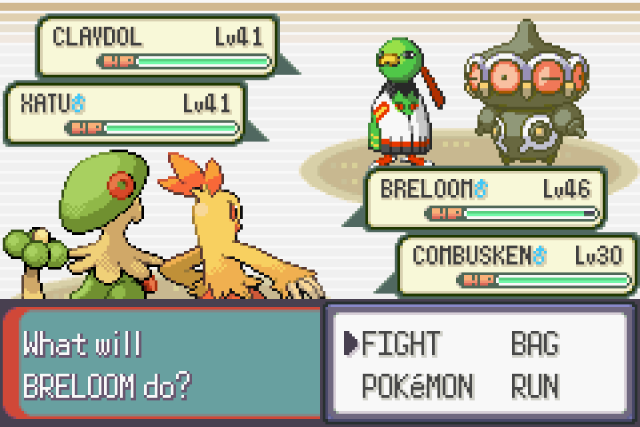
Quite an old post, But for all Pokemon fans out there! You can now play the famous creature-collecting game on your Android device. The game is not available from the Google Play Store, but many hardcore fans use Gameboy and DS emulators just to play Pokémon. Gameboy versions of Pokémon are light enough to work well on Android devices.

Part 1: Getting An Emulator:

Determine which version of Pokémon you want to play. There are many different versions of Pokémon that have been released for all of the different Gameboys over the years. You will need a different emulator depending on which version you want to play.

  • Red, Blue, Green, Yellow - Original Gameboy or Gameboy Color emulator
  • Ruby, Sapphire, Emerald, FireRed, LeafGreen - Gameboy Advance emulator
  • Diamond, Pearl, Platinum, HeartGold, SoulSilver, Black, White, Black 2, White 2 - Nintendo DS emulator
  • X, Y - Not currently possible
Find the right emulator. Once you have determined which version you want to play, you will need to download the right emulator. This program pretends to be the Gameboy system on your Android device, allowing you to run ripped versions of the game (called ROMs). Below are some of the more popular emulators available on Android, though this list is not exhaustive:
  • Gameboy/Gameboy Color - GBCoid
  • Gameboy Advance - GBAoid or John GBA Lite
  • Nintendo DS - DraStic
Check the system requirements. Before downloading an emulator, ensure that your phone meets the system requirements for the app. Some of the newer emulators such as DraStic may only run on newer devices. All apps will post their system requirements in the App Description.

Install the emulator. Different emulators have different installation methods, but generally it's pretty straightforward. John GBA Lite and DraStic can be installed from the Play Store, but GBCoid and GBAoid need to be downloaded from a browser and installed manually:

  • Open your device's Settings menu.
  • Tap Security.
  • Check the "Unknown sources" box.
  • Download the emulator from its website, or copy the APK file onto your Android device from your computer.
  • Find the APK file on your device using a File Explorer app. Tap it to install the app.
Download the Gameboy Advance BIOS file. If you are installing a Gameboy Advance emulator, you will need to download a separate BIOS file. This file is not included for legal reasons, but can easily be found online by searching for "gba_bios.bin"
  • Place this BIOS file somewhere on your phone that is easy to find. It is recommended that you place it in the same folder that you will be placing your ROM files in.
  • You will be asked to locate the BIOS file when you start your Gameboy Advance emulator for the first time.
Part 2: Downloading A Pokemon Rom:

Find a ROM site. There are a variety of sites online that allow you to download ROM files for various Gameboy games. These sites vary in legality, and many of the shadier ones may be littered with popups and scams, so make sure that you downlaod from a more trusted site, such as www.coolrom.com.

  • You can use the browser on your mobile phone to download the ROM files, or you can download them on your computer and then copy them onto your phone.
Browse for the Pokémon game you want. Find the section of the website that contains the Pokémon game you want to get. For example, if you want Pokémon Black, you'll need to find the Nintendo DS section. If you want Sapphire, find the Gameboy Advance section.

Download the ROM. If you are using your mobile browser, download the ROM .zip file onto your device. If you are using your computer, download it and then transfer it to your mobile device.


Place the ROM in a dedicated folder. You may find it easier to collect all of your ROM files in one place, especially if you are downloading multiple games. You can use a file manager app on your phone to move the files to a dedicated folder, or you can plug your device into your computer and use Windows Explorer to move files around.


Part 3: Playing The Pokemon Game:


Open your emulator. Depending on which emulator you chose, the process for opening ROMs may vary. Some emulators will ask you to browse for the ROM immediately when you launch the emulator, others you will need to tap "Load ROM" or "Open".

  • Some emulators such as GBAoid will prompt you for your ROM folder location. This is when having all of your ROMs in one location will make things much easier.
Select your game. After the app completes its search, the list of games you have downloaded will appear on the menu. To play, simply tap on the name and the game will start automatically.

Start playing. Most emulators will place virtual buttons on the touchscreen that emulate the physical directional pad and buttons on a Gameboy. Use these to control just as you would on a real Gameboy. Many emulators allow you to choose where these buttons appear, or allow you to connect another controller via Bluetooth.


This is not only for Android, If you wish to play Pokemon on your PC, Download Visual Boy Advance Emulator.

Subscribe for more post right into you email inbox!

Sunday, 20 July 2014

Unknown  /  7:03 pm  /  , ,   /  No comments
You start working on someone else's, or may be a public computer and you realise that all your important files are on Dropbox (or Google Drive). And you've always hated their web versions. What do you do now? How about a thumb drive running the portable version of those tools? Not only for Dropbox but for all your favorite apps!

A portable app is a computer program that you can carry around with you on a portable device and use on any Windows computer. When your USB flash drive, portable hard drive, iPod or other portable device is plugged in or your cloud drive is synced, you have access to your software and personal data just as you would on your own PC. And when you unplug the device, none of your personal data is left behind.

No Special Hardware - Use any USB flash drive, portable hard drive, iPod/MP3 player, etc
No Additional Software - Just download, run the portable installer and go
No Kidding - It's that easy

Consider the Possiblities...
  • Your favorite web browser with all your bookmarks close at hand
  • Your presentation AND the required software ready to go for that big meeting
  • Your important passwords and account information securely encrypted and always with you
  • Your antivirus program and other utilities ready to fix PC problems
  • Your calendar with all your appointments
  • Your own email client with all your contacts and settings
  • Your instant messenger and your buddy list
  • Your whole office suite along with all your documents

PortableApps.com is the world's most popular portable software solution allowing you to take your favorite software with you. A fully open source and free platform, it works on any portable storage device (USB flash drive, memory card, portable hard drive, etc), cloud drive (DropBox, Google Drive, etc), or installed locally. With millions of users all over the world and a full collection of open source software as well as compatible freeware and commercial software and partners in the software and hardware industry, PortableApps.com is the most complete solution for life on the go.

For more information, visit PortableApps.com

Saturday, 31 May 2014

Unknown  /  11:52 am  /  , , , ,   /  2 comments
 EDIT: This trick is obsolete.


Googling for something, I caught up with an awesome trick to download 'apk files' directly from Google Play. Previously I have already posted a trick to download Apk files from Play Store, But this method is more easier and time saving! Your device may not be as powerful as Nexus, Moto G or some high-end phone, But if you think your phone can handle the game which is marked 'Incompatible', This trick will surely be useful to you. Ok, Now Coming to the trick:

STEP 1: Go to Play Store Website and search for the game you would like to download.
STEP 2: The game's URL should look something like 'www.play.google.com/.......' All you have to do is replace the 'play.google.com' part with 'apk-dl.com'
STEP 3: The download box should popup prompting to download the apk file, Download it and install it to your device.

This trick is well tested on many phones and works properly.Alternatively, You can visit www.apk-dl.com and place the Play Store link and download the app.

Hope you enjoyed this trick. Subscribe for more tricks right into your E-Mail Inbox for free!

Tuesday, 22 April 2014

Unknown  /  12:20 pm  /  , ,   /  No comments

Millions of photographs are being shared every day on Facebook, Twitter, Instagram and other popular social media networks. Most of these photos are boring and drab, to be frank. Surely, photography is a serious occupation and we all love high quality pics taken by professionals, but I think that sometimes it shouldn’t be taken so seriously. Why not make a hilarious photograph and make your family and friends laugh hysterically? There are so many absolutely free online editors offering tons of funny effects, filters and backgrounds to help you create a true masterpiece! In this article the focus will be on some of the most popular online editors. They’ll keep you entertained for hours, so stock up on popcorn before opening any of them :)!

Webcamio

Webcamio is a kind of online photo booth. Its interface is so simple and straightforward that anyone, at any age can effectively use it. All you need is an Internet connection, functioning web camera and some inspiration! Webcamio will do the rest. This program operates in the cloud, so no download/installation is required. Just click the ‘Get Started’ button and the software will immediately detect your camera and start using it (after your consent to do so, of course). You will see your face on the screen and a set of effects and filters below. Select the desired effect (most of all I liked their distorting mirrors) and make a snapshot. When it’s ready, share the picture using one of the social media buttons or download it to computer. That’s it! Fast, free and dead simple.

PhotoFunia

Unlike Webcamio that uses your web cam to make new photos,PhotoFunia uses your existing photographs. This website offers a wealth of predetermined effects and backgrounds that will instantly add a spark to your photos. I was surprised to discover such cool effects like ‘Fat Maker’ or ‘Zombie’ for instance – you’re bound to try those! In addition to the desktop version, PhotoFunia also runs iOS, Android, Windows Phone and other apps. All effects are grouped by industry for easier browsing: Filters, Drawings, Billboards, Frames, Books, Professions, Movies etc.

Pixect

Pixect strongly resembles Webcamio, but you still may want to check it out, since each online editor has its own, unique feature set. Specifically, Pixect features the ‘multi-frame capture’ mode and very accurate brightness, contrast, hue and saturation editing tools. Pixect uses your camera to make snapshots. It doesn’t collect data about your camera and images – it doesn’t even store processed photos on its own servers – all pictures are being saved there temporarily and deleted automatically.
Brighten your day with one of the described online photo editors – no registration required, no fees – just excellent service and hundreds of smiles! Surprise your friends and loved ones with a romantic collage or creative, hilarious image – they will be laughing in no time! There are so many cool and insane ideas to employ! Photo editing has never been easier and funnier. Feel free to share your experience in comments :).

Tuesday, 8 April 2014

Muruvazhakan  /  1:52 pm  /  , , , ,   /  No comments
Whatsapp is considered to be most sought-after messenger for Apple iOS, Android, Nokia S40 and Symbian 60, Blackberry and Windows Phone. Apart from sending texts, users can also share audio and video files as well as images. However, it offers these facilities with some limitations

  1. Users can share videos, images and audio only. It doesn’t come with any built-in function that can allow users to share Doc, PDF, APK and more.
  2.  The size of any file to be share shouldn’t exceed 16 MB. It means videos over 16 MB cannot be shared. However, Whatsapp comes with functionality to compress or trim video files before you share.  However, it still has limitation. Sending very large videos is not possible.
  3. While sending images, Whatsapp compresses and sends it to the recipient. Though you cannot find any difference on mobile, one can notice the quality reduction in computer. It will reduce the quality if you send HD images.
These were the critical problems with Whatsapp. But you can share any video, image, audio or any other type of file through third-party sources without compromising quality and share them with your buddies. However, it can be a bit lengthy. So, have a look on some easy steps to share media to your friends with no loss of quality. All you need are Dropbox and CloudSend for Android.

Steps to Share PDF, ZIP or APK files
  1. First of all, download and install official Dropbox app. There is no problem if you have Dropbox account already. Signup for an account if you don’t have one. Login to it.
  2. Then download and install CloudSend. When you launch the app, you will go through a quick tour. All you have to swipe from right to left on your device’s screen. It will ask you to authorize this app by the end. All you have to click Allow. In your Dropbox folder, a folder will automatically be created named “CloudSend”. You will be able to control it completely. Now you can close the app after completing the authorization.
  3. In order to send any type of file, press and hold the file through file manager and choose Share button.
  4. Choose CloudSend option from popup.
  5. Hold on while the selected file is being uploaded on CloudSend folder created on Dropbox. The duration of file transfer vary according to the connection speed and size of file. The best part of CloudSend is that it doesn’t have any restrictions regarding file size. You will have two options after completion of upload – Copy and Share. Either you can share file or copy the link of any file directly.
  6. When you select Share, you will be able to share your file in different platforms like Email, Whatsapp, SMS, Google+, WeChat, Facebook and other applications your device have. Select WhatsApp.
  7. It will prompt you to choose WhatsApp contacts you want to share that link with. Share that link with your desired recipient. It will show link with file name. If file is supported on your friend’s device, it will show the preview of file. Or file can also be downloaded through other browser.

Enjoy your sharing!!!

For More Posts Right Into Your Email Inbox, Subscribe For Email Posts!!

Monday, 7 April 2014

Muruvazhakan  /  10:33 pm  /  , , ,   /  No comments
EDIT: This Method Does Not Work Anymore

Guys Subway Surfer Game is getting more and more popular. In very less time, Subway surfer has become so Popular that it can be found on 90 % of android devices.


Friday, 28 March 2014

Unknown  /  12:01 pm  /  , ,   /  No comments
Fairly or unfairly, Google's Android often gets knocked for having a lagging or stuttering user interface when compared to Apple's iOS on iPhone and iPad. TiPb's previously guessed that this stemmed from very early architectural decisions made by Apple, who had a full screen, multi-touch UI -- albeit it a highly limited one -- in mind from the outset, as opposed to Google who originally had Android set up as a BlackBerry, Windows Mobile Standard, and Nokia competitor that had no need for high performance, sophisticated UI rendering.
That might turn out to be pretty much the case. In response to a Google+ post about hardware acceleration by Android engineer Dianne Hackborn, ex-Google intern Andrew Munn breaks down why Android's way of handling graphics and event processing hinders the OS from offering users a more fluid, lag-free UI.
Android UI will never be completely smooth because of the design constraints I discussed at the beginning:

  • UI rendering occurs on the main thread of an app
  • UI rendering has normal priority
The iPhone changed things by introducing a dedicated thread with high priority for handling UI rendering, redirecting all power (CPU and GPU) to handling UI element rendering in realtime based on touch input. The result? Smooth-as-butter UI elements, transitions and animations as soon as you touch the screen -- even on older hardware when paired with the latest iOS 5 software. The drawback: everything else, from app downloads to content rendering will pause so the UI can keep that high frame rate, high quality redraw pace.
Munn does disclose that he was only an intern with Google's Android team and never actually got his hands on the raw Android source code, so this could be taken as supposition.
Jerry Hildenbrand from Android Central says there might be a bit more to it:
The way it stands now, as long as you have free resources to run multiple UI threads [in Android] the UI is amazingly smooth -- easily as smooth as the iPhone or WP7 phones. Problem is that nobody sets resource management up in a way to keep them free. A simple customization to the linux lowmemkiller kernel parameter fixes it, at the expense of huge memory hogs like Facebook or HTC applications. One day, when we have Octocore 12NM Cpu's, DDR3 RAM, and huge batteries this way will prove better. For now, you have to hack at it.
So Android can be set up to prioritize UI, if that's what's wanted, but it's not automatic like iOS. That might annoy user experience snobs, like our friends on the Iterate podcast but it might be a fine tradeoff for those with other priorities, like the big screens, different skins, and high customizability that Android's design does allow.
Text Source: www.imore.com
Image Source: www.techulator.com
Unknown  /  10:58 am  /  , ,   /  No comments
The Computer History Museum and Microsoft released the source code for some of the earliest versions of MS-DOS and Word For Windows. And it turns out amongst all the history there's some interesting stuff.P
Developer Leon Zandman has been combing through the code, and found some examples of Microsoft coders slipping jokes, f-bombs and even some Shakespeare into the actual lines of code powering some of early computing's most important programs. P
Click To Enlarge Images.


P
P
© 2016 Useless Games! All contents and other copyrights are properties of their respective owners.

Search